Agents that keep working for you
An agent behind a text box does the work you remembered to ask for. But much of the work that runs a company recurs, like the Monday market brief or the weekly pipeline report, or reacts, to a closed deal, a new file or an urgent ticket. No one should have to sit there and press go.
Today we are shipping triggers. Any agent you build on aixplain can now start on its own, on a schedule you set or an event it watches for, within the scope, limits and approvals you give it. Nothing about how you build changes.
Two ways an agent can start
On a schedule
A time-based trigger runs an agent once at a set time, every few minutes or hours, daily, weekly or monthly, in the timezone you choose. Put the Market Research Analyst on a 7am schedule and a competitive brief is waiting before standup, every day.
On an event
A hook-based trigger runs an agent when something changes in a tool it is connected to: a new email, a new file, a closed deal, a finished call. The tool sends the event to aixplain and the agent picks up the next step.
Ask Omni, then check Schedules
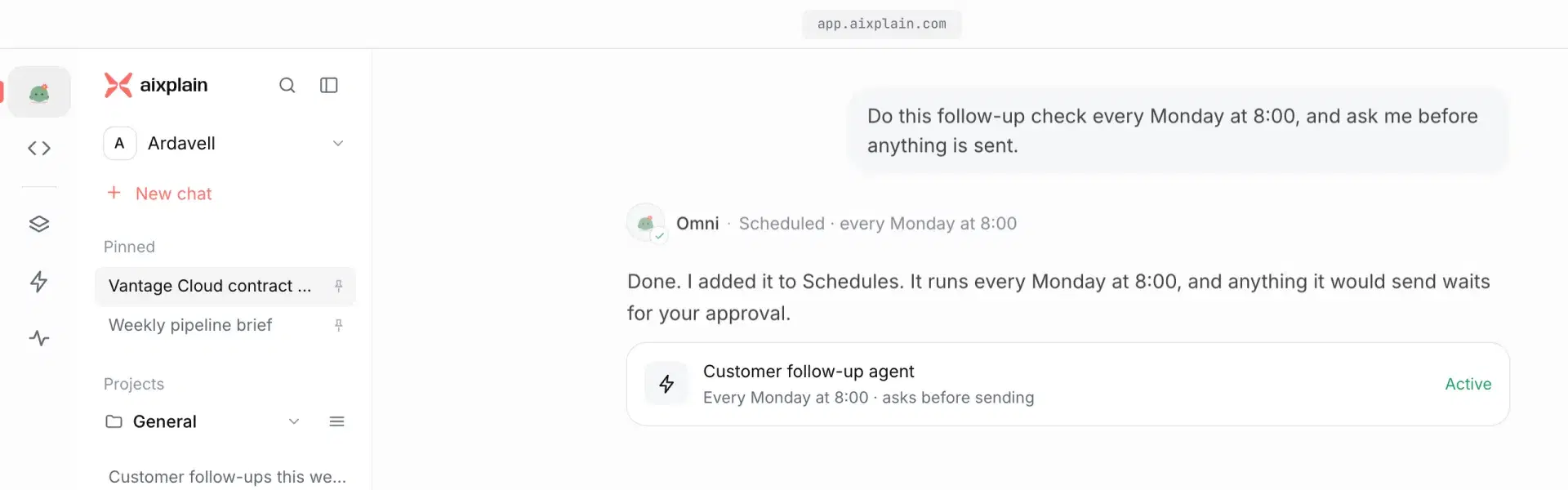
Tell Omni what to repeat and when, in plain words, and it sets up the trigger. Here, “Do this follow-up check every Monday at 8:00, and ask me before anything is sent” becomes a weekly schedule that holds anything it would send for your approval.
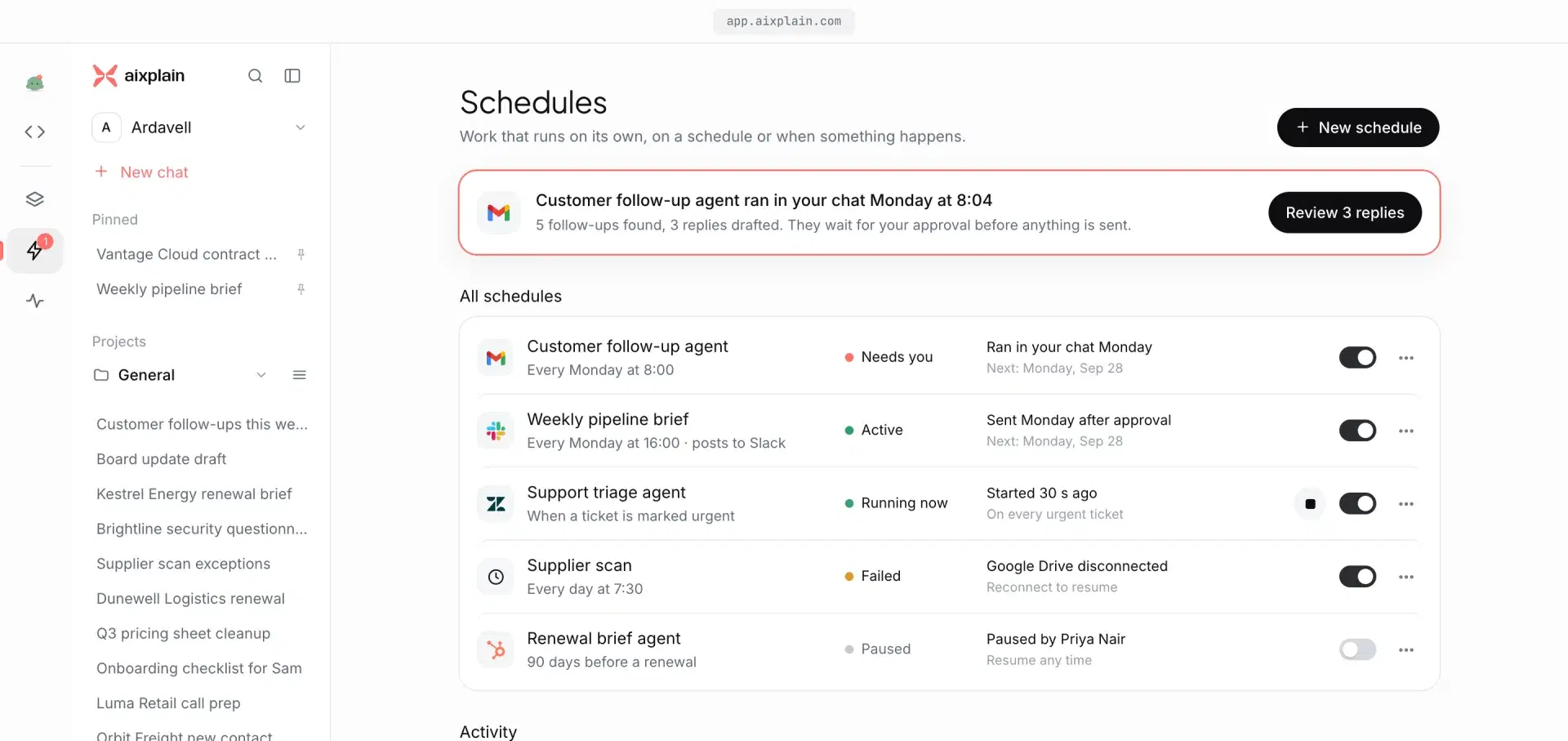
Every trigger, whether you asked Omni or set it up yourself, lands on the Schedules page: what it runs, when it runs next, and whether it needs you. Time-based and hook-based triggers sit side by side, a switch pauses any of them, and the activity log shows what each run did.
Triggers fit every kind of agent
- Personal agents. Your inbox-triage agent runs on each new Gmail message instead of when you finally open your inbox.
- Workflow agents. When a Google Calendar meeting ends, the Meeting Notes Orchestrator writes the recap, logs the action items and updates the account in HubSpot. Before the next one starts, the Meeting Brief Generator pulls pipeline from Salesforce into a prep doc.
Every event comes from an integration in the aixplain Marketplace, such as Google Calendar, Gmail, Slack, Google Drive, HubSpot or Salesforce, connected in a few clicks. The agent works where your work already lives, on the model you choose, from GPT-5.5 to Claude Opus 4.8 to open models like Qwen3.5.
Autonomy you can account for
An agent that starts on its own is only useful if you can account for everything it does. On aixplain that control is set before the trigger fires and recorded after every run, in the runtime, not in the prompt:
- Approvals. You decide what needs a person. A triggered agent can find, draft and prepare on its own, and anything you mark for approval, like an email to a customer, waits until someone approves it.
- Behavior and data. Each action is checked against what the agent is allowed to do, with least-privilege access scoped by workspace, member, API key and third-party tool auth. Your data stays in your perimeter, on cloud, on-prem or local.
- Cost. Budgets and limits hold as the agent runs again and again, so a schedule never becomes a surprise.
- Traceability. Every run and its full trace is recorded. Open any run from the dashboard to see what the agent did, which tools it called and where it stopped.
Turn one on in two minutes
- Open an agent you already have, or one from the Marketplace like the Market Research Analyst. Or ask Omni.
- Add a trigger: a schedule for recurring work, or an event from a connected integration like a new file in Google Drive or an ended meeting in Google Calendar.
- Set the scope, the limits and what needs your approval. When the moment arrives, the agent runs and the run shows up in your dashboard.
For builders: triggers in the SDK
Triggers are created, listed, paused and deleted from the aixplain SDK, next to the agent they belong to. A time-based trigger and a hook-based one:
from aixplain import Aixplain

aix = Aixplain(api_key="YOUR_API_KEY")
agent = aix.Agent.get("YOUR_AGENT_ID")

daily = aix.Trigger(
    name="Daily digest",
    agent=agent,
    input="Summarize today's priorities in three bullets.",
    every="day",
    at="09:00",
    timezone="Europe/London",
).save()

# Your Gmail tool, from tool.id after you connect Gmail
gmail_tool = aix.Tool.get("YOUR_GMAIL_TOOL_ID")
triage = aix.Trigger(
    name="Triage inbox",
    agent=agent,
    input="Triage this email and flag anything urgent.",
    event=gmail_tool.triggers["GMAIL_NEW_GMAIL_MESSAGE"],
).save()
Use run_at for a single run, or every with "hour", "week" or "month" for other cadences. Then list, pause and remove them:
for trigger in aix.Trigger.search(agent=agent).results:
    print(trigger.name, trigger.trigger_type, trigger.enabled)

daily.enabled = False  # pause; set it back to True to resume
daily.save()

triage.delete()
Every option is in the triggers guide on docs.aixplain.com.